Payroll and pay statements
Thryve works out what each instructor is owed. You pay them and mark it paid.
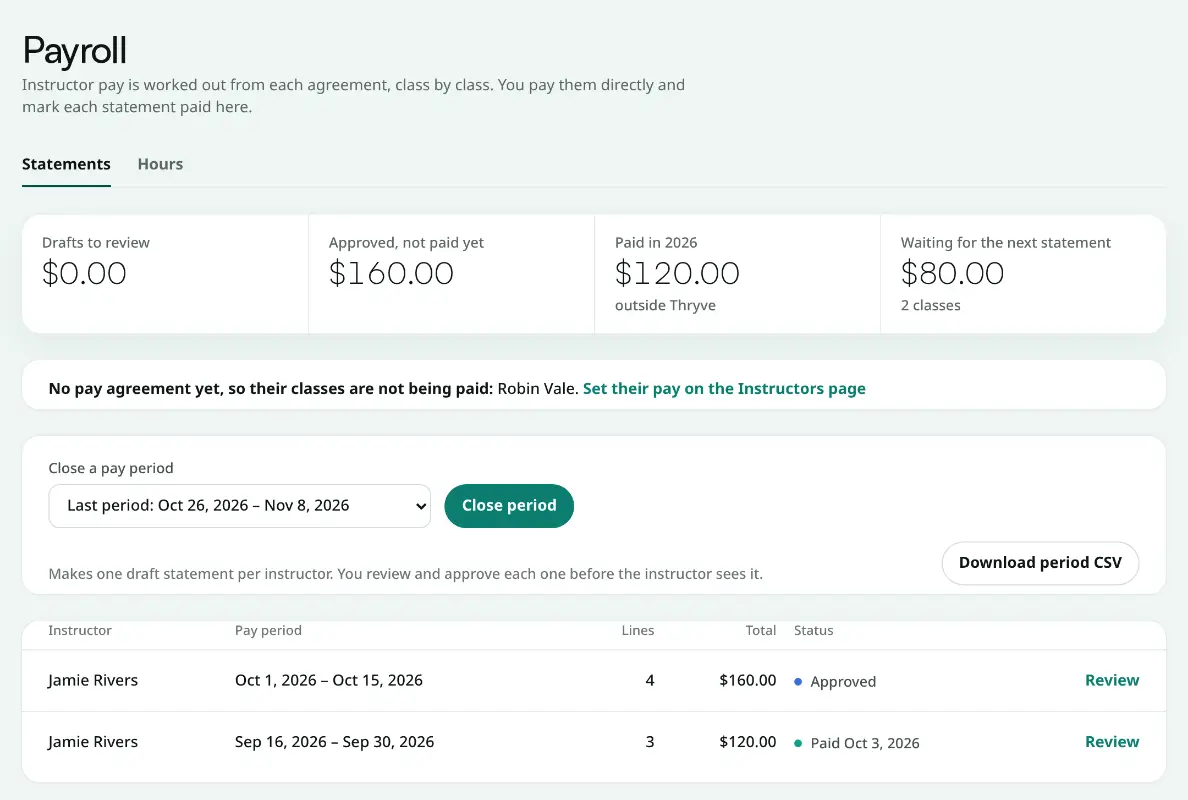
Open Payroll in the sidebar. The Statements tab opens.
Under How often you pay, pick your pay schedule and choose Save.
At the end of a pay period, pick it under Close a pay period and choose Close period. Thryve makes one draft statement per instructor.
Choose Review on a statement to check every class on it. Add a bonus, correction or reimbursement with Add adjustment if needed.
Choose Approve. The instructor can now see the statement.
Pay the instructor the way you normally do. Then pick how you paid under Paid by, the date, and choose Mark paid.
You pay your instructors
Thryve doesn't send money to instructors. It calculates their pay from each accepted agreement: per class, by the hour (the scheduled class length), or a percentage of the class price times the people who attended.
Fixing a statement
A paid statement cannot change. Put any correction on the next statement. To start over on an approved one, void it: its classes go back into the next close.
Instructors without an accepted pay rate are listed at the top of the page, and their classes are not paid until they have one. Download period CSV gives you a file for your payroll provider.